
ADA Accessible Medical Equipment Deadlines 2026: Complete Compliance Guide
Table of Contents The 2026 ADA Accessible Medical Equipment Compliance Landscape Understanding the ADA's 2026 Medical Equipment Accessibility Mandate The DOJ and…
Read More
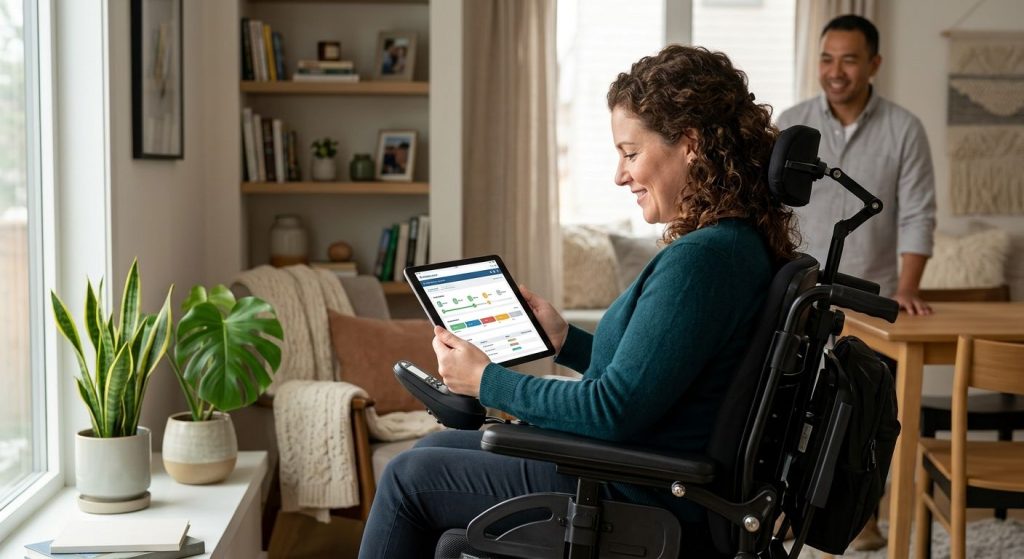
Once we finalize your custom motorized wheelchair order, you gain immediate access to our DME (what is dme) Track login. This secure, user-friendly portal from MedEquipped keeps you informed at every stage of your order, delivering real-time transparency from design approval to final delivery.
You can monitor key milestones such as:
To track your DME order status, simply log in from our website using the unique credentials we provide after your order is placed. The DME supplier portal login reduces the need for phone calls and gives you reliable, on-demand access to your order’s progress. Tracking information is provided for convenience; actual timelines may vary.
While your chair is being built, we also help you navigate funding options to keep your experience seamless. Our commitment is to provide greater independence through transparency at every step.
Now that you know what the DME Track portal can do, you’re ready to prepare for your first dme track login. We’re here to help you achieve greater independence with your custom motorized wheelchair.
If you need a refresher on what is dme, our FAQ page explains the basics.
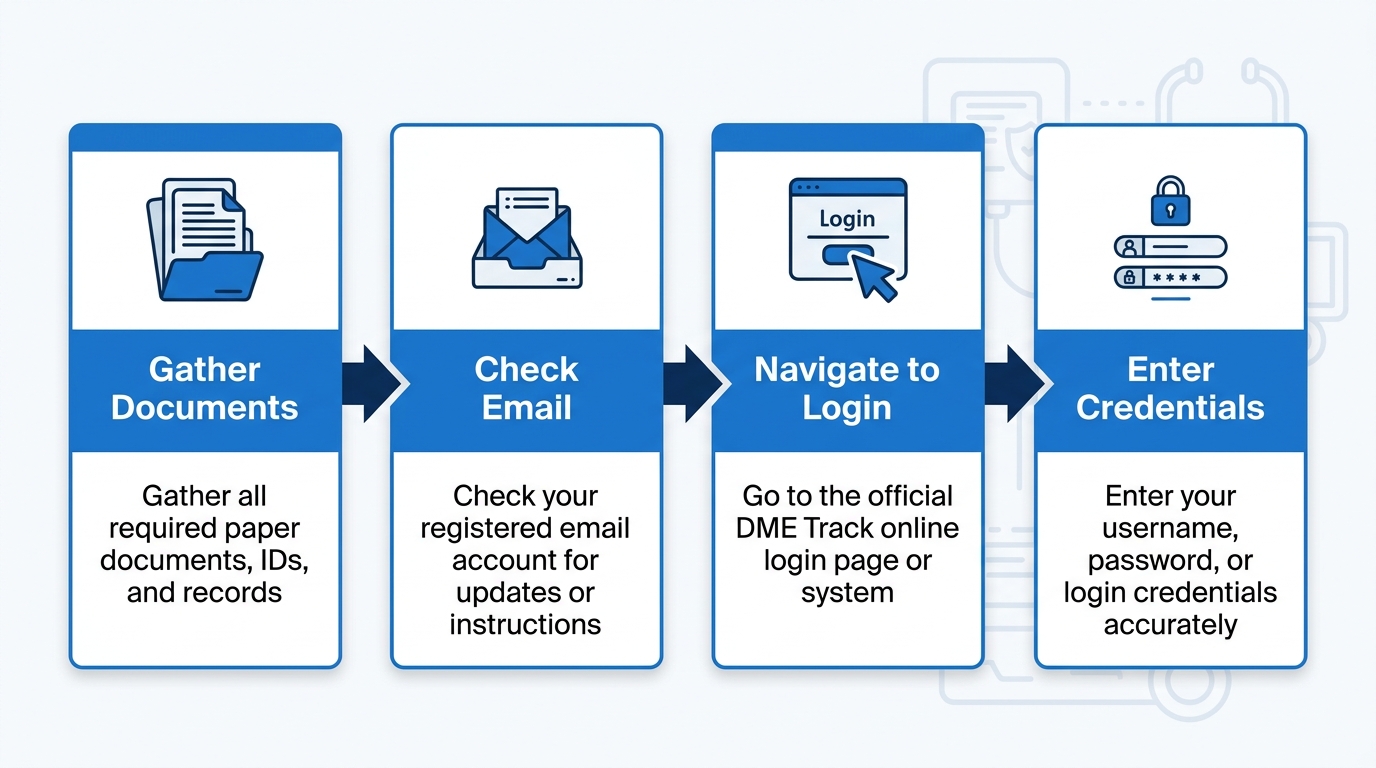
Login preparation process for DME Track at MedEquipped.
To access the portal, go to poweredwheelchairs.medequipped.com and click “Patient Portal” in the top menu. This is also called the DME supplier portal login, giving you direct access to order updates and funding details. If you haven’t set up an account yet, select “Register” or “First Time User.” For a lost password, use the “Forgot Password” link—allow 5–10 minutes for the reset email to arrive.
Once logged in, you can track DME order status and monitor your custom motorized wheelchair’s progress. Results may vary; verify with our team.
If you run into persistent login problems, call us at (845) 237-2381 or reach out through our contact form. Our team is committed to your mobility, and we’re here to help with your premium custom wheelchair and quick turnaround times.
Now that you understand what DME Track is, let’s guide you to the login page. To access the dme track login portal, follow these simple steps:
This dme supplier portal login is designed specifically for authorized suppliers and providers to manage orders efficiently. Using the portal, you can track DME order status, review documentation, and monitor fulfillment timelines. If you need clarification on what is DME, refer to our detailed guide for a complete overview. Should login issues persist, we’re here to help — contact our support team during business hours for direct assistance.
To stay informed about your custom motorized wheelchair order, complete a dme track login with your patient account credentials. Start by visiting the MedEquipped homepage and clicking the “Patient Login” link, or go directly to the secure portal page. There, enter the email address and password you provided during your account setup or initial evaluation.
If you forget your password, click “Forgot Password” on the login screen, enter your registered email, and we will send you a reset link. If you don’t see the email within a few minutes, check your spam folder. This patient portal is exclusively for individuals with custom motorized wheelchairs; it is separate from the supplier login used by providers.
Once signed in to your dashboard, you can track dme order status, review funding paperwork, and see delivery updates. If you have any trouble logging in, we’re here to help. You can also call us at (845) 237-2381, Monday through Friday, 9:00 am to 5:00 pm, for immediate assistance.
Resetting your DME Track login password is quick and easy. Follow the steps below to regain access to your account and continue managing your mobility orders.
First, navigate to the DME Track login page and click the “Forgot Password” link beneath the password field. Then, enter the email address exactly as it appears in your account. We will send a password reset email to that inbox.
Check your inbox and spam folder for a message from MedEquipped. If the email does not arrive within a few minutes, use the “Resend Email” option or contact our support team. Results may vary for response times.
Click the reset link in the email and create a new password. Typically, the system requires at least 8 characters with a mix of uppercase, lowercase, and numbers. Once your password is reset, you can log into the DME supplier portal login area to track DME order status.
If you need further assistance, contact our support team at (845) 237-2381, Monday through Friday, 9 am to 5 pm. We’re here to help.
Once your order is placed, you can monitor its progress through our order tracking dashboard. Use the DME track login page to check your custom wheelchair order status with MedEquipped in Spring Valley, NY.
If the status remains unchanged for more than 10 business days beyond the estimated 30–60 day window, contact our team directly. Production timelines are estimates and may vary. Please check with your clinician for medical necessity documentation if needed.
When your wheelchair is ready for delivery, the dashboard will show a status update. Our team will then contact you to arrange setup.
Once your custom wheelchair order is confirmed, you can see your exact configuration by logging in on the DME track login page. Inside the DME supplier portal login, you’ll find a detailed specification sheet that lists your personalized choices: seating width, depth, and back height for optimal comfort and posture; drive type (mid-wheel or front-wheel) to match your maneuverability needs; battery range and motor type to support daily mobility; and your assigned control interface, joystick, head array, or sip-and-puff, based on your physical capabilities. We source Premium products and build every Custom Motorized Wheelchair to support your Greater Independence. These specifications are drawn from your clinical evaluation and personal preferences; we never apply a one-size-fits-all template because each chair is configured to your unique body dimensions, mobility needs, and daily environment. The same portal lets you track your DME order status and follow your order from fabrication to delivery, with updates that reflect our Quick turnaround commitment. The portal is accessible around the clock, so you can check your configuration and order updates whenever it’s convenient. If you need help viewing your configuration or want a copy of your specifications, we’re here to help; simply contact us and we’ll assist. (Results may vary; final specifications are confirmed during fitting.)
Once your evaluation is complete and your custom motorized wheelchair order is placed, you can monitor your schedule through our DME track login. MedEquipped delivers Custom Motorized Wheelchairs with a quick turnaround — typically 30 to 60 days — helping you achieve greater independence faster.
The process starts at our evaluation center in Spring Valley, NY, where a certified ATP performs your personalized fitting. After your order is placed, you’ll receive updates at key milestones such as order confirmation, fitting appointment, and shipping. You can also use the DME supplier portal login to track DME order status. For questions about your specific timeline, please contact us directly; we’re here to help.
When your wheelchair arrives, our team provides smooth delivery and setup with clear instructions. Results may vary based on funding authorization; MedEquipped assists with paperwork but does not guarantee Medicare or insurance coverage. Always consult your healthcare professional for medical necessity.
Once your order is placed, you can track every step through our secure online portal for DME track login. Visit the DME supplier portal login page—find the “Account Login” button—then enter your username and password.
From your account dashboard, you can track DME order status, review your full order history, and access past communications. You can also view and download essential documents, such as completed Medicare forms, insurance verification, and your physician’s prescription with medical necessity documentation. The portal shows your funding progress, indicating which steps are complete and which remain pending.
Our team is here to help if you have any trouble with the DME track login process or locating documents; just call us. You can manage multiple wheelchair projects under one account. While we work to expedite funding, results may vary and Medicare coverage is not guaranteed. Log in today to stay informed. After reviewing your account history, the next step is preparing for delivery.
If you’re experiencing trouble with your DME track login, we’re here to help. Login issues can be frustrating, but most common problems have simple solutions. We’ll walk you through each fix step by step so you can get back to tracking your custom motorized wheelchair order quickly.
Once you’re logged in, you can track DME order status and manage your account. Please note that the DME Track login is for patient orders only. Suppliers who need to access the government system should use a separate dme supplier portal login at CMS. For supplier-specific account help, refer to the CMS Supplier Portal guide. The CMS Supplier Portal guide provides official instructions for supplier account management and claim submission.
If none of these steps resolve your login issue, reach out to our MedEquipped support team at (845) 237-2381. Our team is available Monday through Friday, 9:00 am to 5:00 pm Eastern Time. Results may vary; not all issues can be resolved remotely.
After you’ve completed your evaluation and submitted your order, stay informed every step of the way through our DME Track Login portal — your dedicated DME supplier portal login. This online system gives you full transparency into your custom motorized wheelchair, which we design for your Greater Independence using premium products built to your exact specifications.
With our typical 30–60 day quick turnaround, your custom motorized wheelchair reaches you fast, built for greater independence.
Results may vary — please consult your healthcare provider for medical necessity and verify your coverage with Medicare. MedEquipped assists with Medicare verification but does not guarantee coverage.
Table of Contents The 2026 ADA Accessible Medical Equipment Compliance Landscape Understanding the ADA's 2026 Medical Equipment Accessibility Mandate The DOJ and…
Read More
Table of Contents Understanding Collision Avoidance Systems for Power Wheelchairs Comparing Collision Avoidance Technologies for Wheelchairs Understanding Sensor Technology Differences How to…
Read More
Table of Contents Front-Wheel Drive Power Wheelchairs: Built for Real-World Mobility Opening Hook & Article Preview Superior Curb Climbing Opening Explanation Example/Tip…
Read More