Category: Smart Wheelchair Technology

  • How to Program a Power Wheelchair: Complete Step-by-Step Guide

    How to Program a Power Wheelchair: Complete Step-by-Step Guide

    Table of Contents

    The Professional Approach to Power Wheelchair Programming

    Learning to program a power wheelchair requires professional programming: configure your speed, acceleration, turning response and sensitivity according to your body abilities as well as your environment. When done correctly, this can promote safety, extend battery life, and help prevent problems such as jerky response, rapid battery drain, or strain and injury. That’s why it’s crucial for you to have a professional program these settings on your power wheelchair.

    Starting with a clinical assessment and a private meeting with patients in order to make sure we understood their specific circumstances, we have optimized all settings – speed, acceleration, and turn response – for a smooth and easy drive at home as well as outside. That’s what makes all our custom motorized wheelchairs unique. This personalized optimization ensures a driving experience that feels effortless from day one.

    Proper preparation is essential before we begin programming. After gathering your diagnostic data, measuring your seating requirements, and verifying your insurance coverage, we can move forward into programming. With all this info ready, the programmers know exactly what you’re looking for in your new chair as well as your body and routine needs.

    Key Takeaways

    • When you’ve reached this page, you should take a careful, structured approach to programming your MedEquipped powerchair that begins well before you connect any cables.
    • The power wheelchair controller is the electrical mind that takes in the commands from the joystick and puts them out into controlled movement.
    • Professional evaluation and controller programming give your power wheelchair a custom fit, matching motor response, speed, and safety settings to your daily routine and health needs.
    • For individuals with severe muscle weakness, EMG switches using surface electrodes detect electrical signals from active muscles and translate them into movement commands.
    • After setting up the input device configuration, we should turn our attention towards the indoor driving modes.

    Before You Begin: Preparing for Programming

    When you’ve reached this page, you should take a careful, structured approach to programming your MedEquipped powerchair that begins well before you connect any cables. Before you actually plug anything up, you need to get a handle on what your workspace and tools are going to look like. Here’s how to create a great work environment.

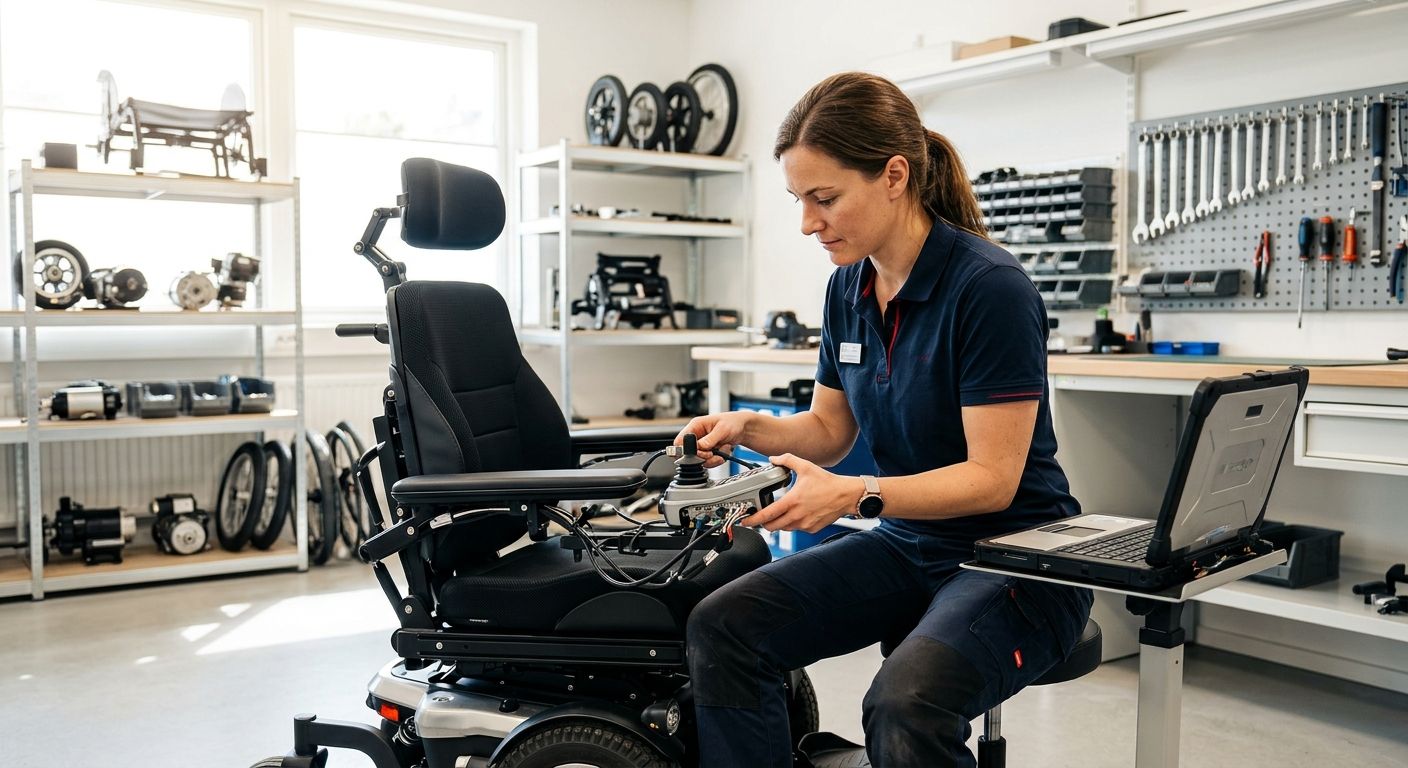
    Firstly, place the wheelchair into a level location and switch it off before attaching the equipment you are going to use to program. Secondly, make sure that the correct programming cable and software for your specific controller model are available and properly installed on a laptop or tablet, and that the computer itself is charged or plugged in. Last but not least, check that the battery within the wheelchair is fully charged to prevent any interruptions that could jeopardize settings during the session.

    Please take a look at the controller’s manual as we have model-specific cautions and parameters in there also. Should you not feel up to doing this on your own, the experts at MedEquipped in Spring Valley, NY can help walk you through this process. Taking these steps supports your goal of greater independence and can help give you confidence that your programming session will go smoothly.

    Once all these preparations have been made, now you can finally come into contact with the parameter setting functions in the controller. The following section will guide you to modify these settings to suit your performance and comfort requirements.

    Step 1: Understand Your Controller and Programming Parameters

    The power wheelchair controller is the electrical mind that takes in the commands from the joystick and puts them out into controlled movement. The most common programmable settings a clinician can adjust include speed limits, the amount of power used when accelerating, how sensitive it is when braking, torque (power), and how responsive the turning is going to be.

    Understanding power wheelchair controller settings explained in plain terms helps you see how each adjustment affects your experience. Lower acceleration improves indoor maneuverability around furniture and tight corners, while higher torque provides the muscle needed for ramps and outdoor inclines. The speed limit governs forward and reverse speed, and fine-tuning turning sensitivity keeps the chair predictable in doorways or crowded spaces.

    When you describe your daily routines and preferences during the evaluation, our clinician can tailor each parameter. Bring your prescription, diagnoses, and home layout details so we can optimize the chair for your comfort. This insight helps you communicate your preferences effectively during the programming session. We’re here to help.

    Step 2: Schedule a Professional Evaluation and Programming Session

    Professional evaluation and controller programming give your power wheelchair a custom fit, matching motor response, speed, and safety settings to your daily routine and health needs. The programming allows for different speeds and motor responses as well as different settings when it comes to safety.

    Call our office at (845) 237-2381 or visit us in Spring Valley to book an evaluation and programming appointment. Our team is available Monday through Friday, 9:00 am to 5:00 pm, at 747 Chestnut Ridge Road, Spring Valley, NY 10977.

    While there, they’ll go over what you need in terms of mobility and adjust the wheelchair’s controller accordingly. The adjustments include joystick sensitivity, acceleration, braking, and any assistive switching you rely on. We can tailor each of these settings around what you want out of the wheelchair based off your body type and lifestyle. As such, you’ll be able to feel more comfortable and confident.

    Our quick turnaround time means that when you’re happy with your settings, your custom order will be ready soon enough. This process forms a base for everyone’s safety, comfort and freedom when using a powered wheelchair.

    Step 3: Customize Safety and Control Settings

    Now that you’ve been professionally evaluated by us and programmed into the cart, we’re able to tweak any safety settings according to your requirements. We can adjust maximum forward and reverse speed limitations to match your daily environment, whether you navigate a home, a care facility, or outdoor paths. This allows us to turn on other safety features too such as tip-over switches, seat-belt reminder systems and tilt alarms, which can be very useful for keeping you safe during your day-to-day tasks, yet they won’t get in the way when you want to go about what you need.

    We set up the stick sensitivity as well as curve for response on the controller so that they steer as predictably and easily as possible. There can usually be multiple drive profiles such as indoor, outdoor, low speed, etc., which can be configured and selected depending on your requirements in different settings. We then lock all of those settings down so there is no chance of them being changed by accident. The final stage involves assigning inputs and switch modes so that everything lines up with what we want to get from our chair.

    Step 4: Configure Input Methods and Switches

    For individuals with severe muscle weakness, EMG switches using surface electrodes detect electrical signals from active muscles and translate them into movement commands. Electrodes remain attached to the skin so input stays stable during seating adjustments. A RESNA study reported consistent reliability over three months and reduced operator fatigue.

    We suggest that you program different types of drive profiles in your Omni+ controller: a fast-speed cruise profile for wide open areas and a slow-speed crawl mode for indoor tight spaces.
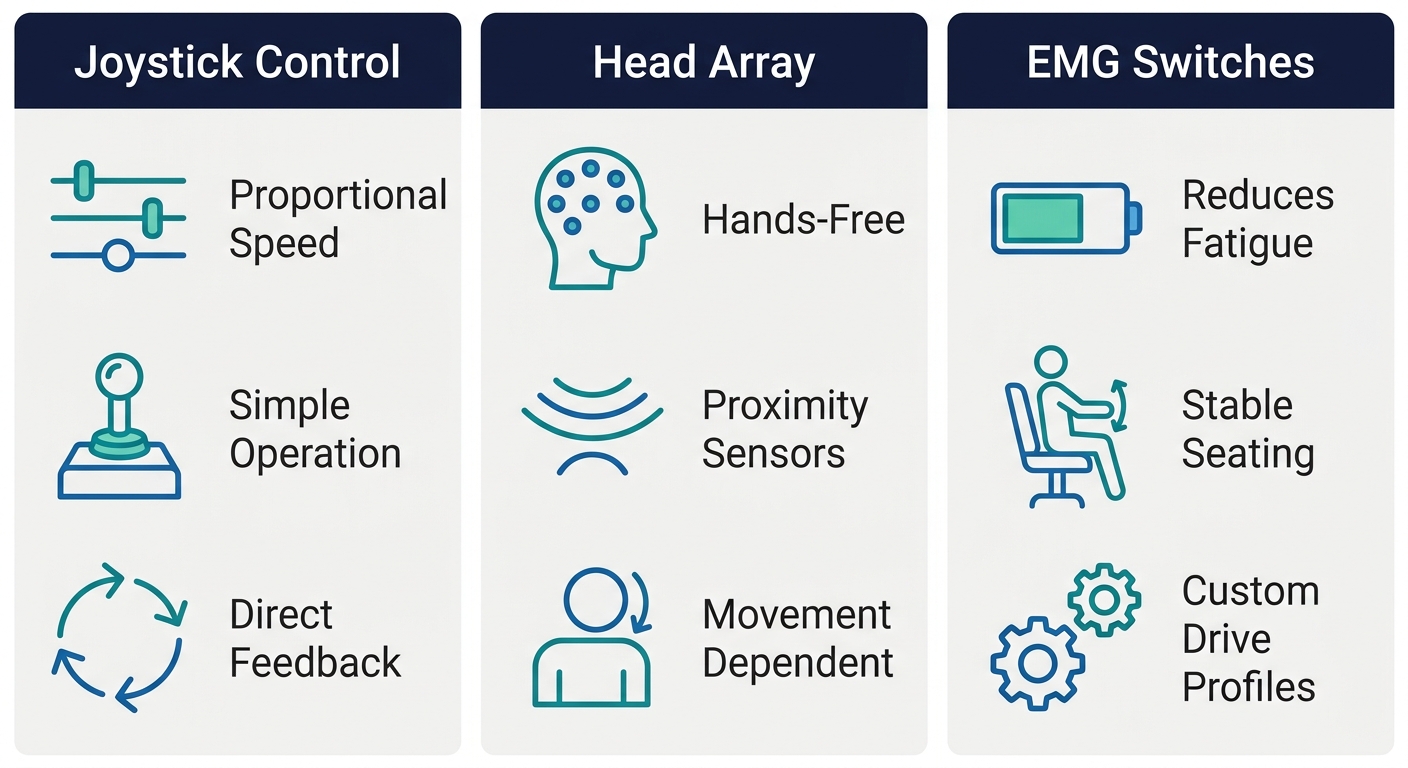
    Infographic comparing three power wheelchair input methods: Joystick Control with proportional speed and simple operation icons, Head Array with hands-free and proximity sensor icons, and EMG Switches with fatigue reduction and custom drive profile icons.
    Three input methods for power wheelchair control: joystick, head array, and EMG switches.

    After this process has been completed, and the user can safely operate his power chair, the driving parameters for each indoor setting may be refined accordingly.

    Step 5: Fine-Tune Indoor Driving Profiles

    After setting up the input device configuration, we should turn our attention towards the indoor driving modes. A presentation at a RESNA conference suggested that drive settings can be adjusted to optimize both speed and accuracy when dealing with confined space situations inside buildings. For instance, one of these settings called Crawl Mode allows the vehicle to move very slowly but deliberately in order to make precise movements. Crawl Mode is illustrated as part of the Omni+ controller setting along with four other settings (RESNA, 2006). An additional Crawl Mode could also be created specific to situations such as entering doorways or maneuvering through bathroom facilities in which precise, centimeter-by-centimeter adjustments need to be made.

    The researchers found another benefit identified in the study: EMG-based control input remains stable even when the user activates seating functions, without needing caregiver repositioning. The skin-worn sensors allowed people’s driving behaviors to remain stable, maintaining consistency. During a three-month testing period, the EMG switch interface maintained reliable performance, supporting independence during daily indoor routines. These indoor settings lay the groundwork for adapting the wheelchair to outdoor environments, where speed and terrain handling differ.

    Step 6: Adapt Settings for Outdoor Navigation

    The next refinement we made involved adjusting how our cars behave in outdoor settings, which presents us with different challenges due to varied road surfaces and longer driving distances than those typically encountered indoors. In order to effectively respond to these situations, we recommend creating a dedicated outdoor profile within Omni+ that optimizes speed, acceleration, and input sensitivity.

    This research showed that EMG input remains stable during seating adjustments when the surface electrode is placed on the active muscle, allowing us to adapt the controller response to that consistent signal and helping maintain reliable control over bumps and varied surfaces. By separating out our outdoor profiles, we have two profiles for dealing with outdoor space. Cruise mode allows us to cover longer distances at a higher speed. Crawl mode gives us extremely tight control as we enter and leave tight spaces.

    Before relying on the vehicle’s outdoor profile, drive it in a safe, open area to check forward and turn behavior, braking response, and comfort. Once settings are confirmed, proceed to final programming verification and safety testing.

    Step 7: Verify Programming and Perform Safety Testing

    Once programming parameters are entered, we confirm each setting operates.

    1. We compare the chair’s actual top speed against the programmed limit and verify the turning radius does not exceed the set cap.
    2. We assess acceleration and deceleration ramps to ensure they feel smooth and predictable, with no abrupt surges.
    3. Stationary checks include testing joystick response in all directions, confirming anti-tip wheels deploy correctly, and verifying power seat functions (if equipped) move within their intended range.

    Secondly, we execute the safety check in a spacious room without obstructions. The wheelchair goes through some tests on a level surface as well as a slight slope to see if its brakes stop properly under each condition. If the wheelchair has obstacle detection sensors, we determine whether they produce auditory or haptic feedback when an object enters the detection zone. When there happens to be some malfunctions or irregularities in this case, those details should all get written down so they could later serve as a basis for reviewing results.

    Should you encounter any problems, the following sections cover programming issues.

    Troubleshooting Common Programming Issues for Power Wheelchairs

    Even if verification is done carefully, bugs could still arise during daily use, which usually appear in the form of odd behaviors or error messages on the screen. Fixing them promptly helps maintain reliable performance.

    Parameter Conflicts

    When you have several settings conflicting, your chair can be sluggish or speed up too much. Typical problems are:

    • Acceleration versus maximum speed – If acceleration is set too high relative to maximum speed, the chair can lurch forward before stabilizing. We recommend reducing acceleration incrementally until movement feels smooth.
    • Turn speed versus forward speed – A tight turn radius combined with a high forward speed can cause instability. Adjust turn speed downward and test in an open area before returning to normal use.

    Calibration Errors

    If the joystick drifts or won’t center after a programming change, recalibrating it usually resolves the issue. Most joysticks have a calibration routine that can be done from within the programming options. Just follow these basic steps to get it back on track:

    1. Enter the calibration mode from the settings menu.
    2. Follow the on-screen prompts to move the joystick through its full range—forward, backward, left, and right.
    3. Release the joystick and confirm the neutral position when prompted.
    4. Save the new calibration profile and power cycle the chair.

    Please consult your equipment manufacturer’s manual for specific information on codes, since these can be different according to brand.

    If this does not fix your problem, the controller may require deeper diagnostic support. Taking care of these simple problems helps ensure the wheelchair is ready for safe, reliable daily use.

    FAQ

    Can I program my own power wheelchair or do I need a professional?

    No, professional programming is required. MedEquipped’s clinicians adjust speed, acceleration, turning response, and sensitivity to your body abilities and environment during an evaluation. They also configure safety features and lock settings to prevent accidental changes, ensuring a custom fit.

    What specific settings can be adjusted when programming a power wheelchair?

    Clinicians can adjust speed limits, acceleration power, braking sensitivity, torque, and turning responsiveness. Joystick sensitivity, drive profiles for indoor and outdoor use, and safety features such as tip-over switches and seat-belt reminders are also programmable. Multiple modes like crawl and cruise allow tailored control.

    How does programming a power wheelchair improve safety and driving control?

    Professional programming matches motor response to your abilities, reducing jerky movement and preventing strain or injury. It enables safety features like tip-over switches, seat-belt reminders, and tilt alarms, while drive profiles tailored for indoor and outdoor use improve predictability and control. Locked settings avoid accidental changes.

    Why is it important to have my power wheelchair programmed by a certified professional?

    A certified professional ensures settings match your specific diagnosis, body abilities, and home environment, which maximizes safety and comfort. MedEquipped’s clinicians conduct a hands-on evaluation to adjust acceleration, braking, and drive profiles, then lock configurations to prevent unintended changes, providing a smooth, personalized driving experience from day one.

    Are there different programming requirements for indoor versus outdoor power wheelchair use?

    Yes, indoor and outdoor environments require distinct drive profiles. Indoor profiles use lower speeds and high precision, like crawl mode for tight spaces. Outdoor profiles increase speed and acceleration for longer distances and varied terrain, with settings optimized for bumps and slopes. MedEquipped programs separate profiles to ensure safe, controlled navigation in each setting.

    Achieving Safe and Independent Mobility Through Expert Programming

    In addition to fixing problems that arise, a good programmer can maximize your wheelchair’s capabilities. For example, when a professional tailors ride performance, seating, and control settings to your personal needs, you gain greater safety and independence in everyday activities. You may experience less fatigue, better mobility, and increased self-confidence.

    At our clinic, we provide personalized evaluations and fittings as part of our custom wheelchair service. Our experienced team manages everything from clinical assessment to funding paperwork, and we deliver custom motorized wheelchairs within 30 to 60 days — far faster than typical industry timelines.

    Understanding how to program a power wheelchair is an important first step, but professional expertise ensures it is done safely and effectively. Contact our Spring Valley office at (845) 237-2381 to schedule your personalized evaluation. Results may vary. Consult your healthcare professional for medical necessity. Medicare/insurance coverage verification is recommended; we do not guarantee coverage.

    Schedule Your Power Wheelchair Evaluation

    Now that you understand the complete process for programming a power wheelchair, it’s time to put that knowledge into action. Professional evaluation and customization are essential for safety and comfort, as we’ve discussed. Our team offers personalized programming sessions at our office in Spring Valley, New York. We’ll assess your needs, adjust critical settings like speed, acceleration, and input sensitivity, and ensure your chair fits your daily environment perfectly. With a typical turnaround of 30–60 days for a custom motorized wheelchair, you can be on the path to greater independence quickly. Call us at (845) 237-2381 or visit our website to schedule your evaluation today. Your journey to safe, confident mobility starts with a single step.

    Schedule Your Power Wheelchair Evaluation
    Resources

  • How Smart Wheelchairs Use Collision Avoidance Systems

    How Smart Wheelchairs Use Collision Avoidance Systems

    Table of Contents

    Understanding Collision Avoidance Systems for Power Wheelchairs

    At MedEquipped, we integrate collision avoidance systems into our custom motorized wheelchairs as a vital smart wheelchair technology. Using sensors, these systems detect obstacles and provide alerts or automatic braking, helping users navigate tight spaces and curbs with greater independence. This smart sensing capability reduces the risk of collisions and supports confident mobility in daily life.

    Our front-wheel drive power wheelchairs demonstrate this advantage as explained in our front-wheel drive FAQ: they are engineered to climb curbs smoothly, aided by collision avoidance systems. These alternative driving interfaces and obstacle detection technologies allow users to move with greater confidence. Results may vary; consult your healthcare professional for medical necessity.

    1. Ultrasonic Collision Avoidance System

    Overview

    When it comes to collision avoidance systems for motorized wheelchairs, ultrasonic sensors offer a retrofit solution. They detect obstacles with high-frequency sound waves.

    Features

    Features include detection up to 2 meters, sensitivity adjustments, and integration with smart wheelchair technology. It works with most joystick controls and folding or rigid frames, with weather resistance (IP65).

    Pricing

    Kits cost $200–$600. Medicare coverage for aging and disability services; verify. We do not guarantee coverage.

    Pros/Cons

    #### Comparison of Collision Avoidance Technologies
    ProductSensor TypePrice RangeBest For
    Ultrasonic Collision Avoidance SystemUltrasonic$200–$600Affordable aftermarket add‑on
    Lidar‑Powered Smart Wheelchair SensorLidar$1,000–$3,000High‑end custom chairs, indoor/outdoor
    360‑Degree Infrared Collision ShieldInfrared$500–$1,200Crowded indoor environments
    Radar‑Based Proximity Warning SystemRadar$800–$2,000Outdoor high‑speed travel
    Camera Vision Obstacle Detection ModuleDepth‑sensing camera$600–$1,500Retrofit with caregiver monitoring
    Bumper‑Activated Emergency Stop SensorMechanical contact$50–$200Last‑resort safety backup
    Acoustic Sonar Safety PackageSonar$300–$800Wet or rainy environments
    Multi‑Sensor Fusion Collision ProtectorHybrid (ultrasonic, lidar, camera)$2,000–$5,000Premium custom wheelchairs
    Bluetooth‑Enabled Collision Alert SystemBluetooth sensors + app$150–$400Caregiver remote monitoring
    AI‑Enhanced Predictive Avoidance ControllerAI + multiple sensors$3,000–$6,000Tech‑savvy users, advanced mobility needs

    Results may vary.

    Best For

    Best for users wanting a cost-effective retrofit solution for their existing chair.

    2. Lidar-Powered Smart Wheelchair Sensor

    Overview

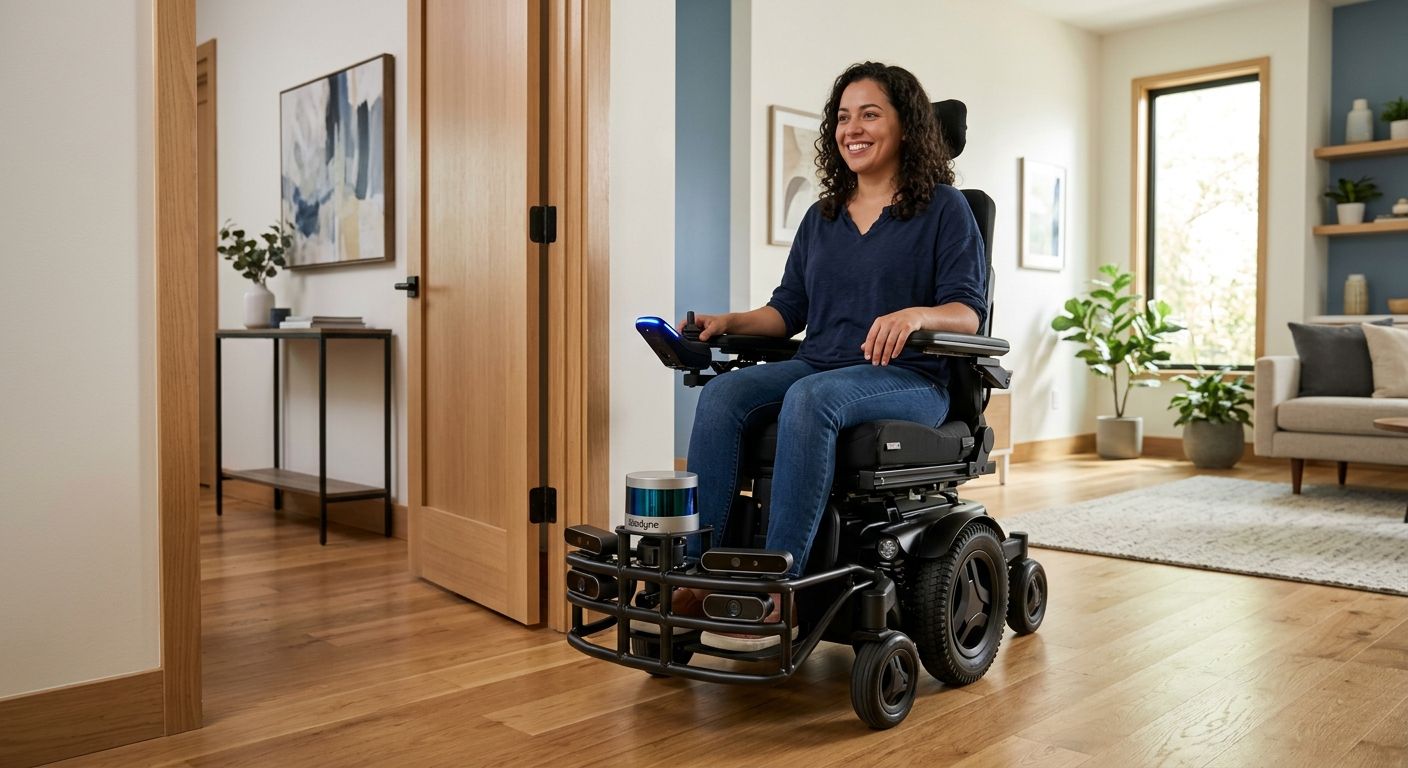
    Lidar, or Light Detection and Ranging, uses pulsed laser beams to build a high-resolution 3-D map of the environment. This sensor delivers centimeter-level accuracy that forms the backbone of advanced collision avoidance systems, even in complete darkness.

    Features

    · High angular resolution (down to 0.1°) for precise obstacle detection · Night-vision capability – needs no ambient light · Compatible with smart wheelchair technology via CAN bus or USB · Adjustable field of view from 90° to 360° These capabilities feed real-time data into collision avoidance systems, enhancing safety.

    Pricing

    As a premium lidar solution, this sensor typically ranges from $1,000 to $3,000. We assist with funding sources and paperwork, but coverage is not guaranteed—verify with your supplier.

    Pros/Cons

    Pros: Extremely accurate detection in all light conditions; identifies objects as small as 2 cm at 20 m. Cons: Higher cost and installation may require professional fitting, which we provide through our personalized fittings service.

    Best For

    Ideal for high-end custom motorized wheelchairs where active users need Greater Independence indoors and outdoors. Our Quick turnaround on custom builds ensures your lidar-equipped chair is ready within 30–60 days, and the system works with alternative driving interfaces for tailored control.

    3. 360-Degree Infrared Collision Shield

    As part of our commitment to offering premium products, we integrate advanced safety features like the 360-degree infrared collision shield. Building on our suite of safety enhancements, this system offers a comprehensive approach to obstacle detection. It operates as a state-of-the-art collision avoidance system, utilizing a ring of infrared sensors that encircle the wheelchair base to provide full 360-degree coverage without blind spots. This design greatly reduces collision risk, especially in dynamic environments.

    Overview

    The shield functions through multiple sensors positioned around the wheelchair’s perimeter, constantly scanning for obstacles. This 360-degree detection capability ensures that objects approaching from any direction trigger a response, enhancing safety in all orientations. It is a crucial component for users who require reliable perimeter awareness during daily navigation.

    Features

    • Full perimeter detection through a network of infrared sensors, eliminating blind spots.
    • Adjustable sensitivity settings that allow users to fine-tune detection distance and reaction thresholds for different settings, from tight hospital corridors to open floor plans.
    • Standard audible alerts (beeping) and visual indicators (LED lights) activate when an object enters the preset range.
    • Seamless integration with our existing smart wheelchair technology, including compatibility with alternative driving interfaces such as joysticks, sip-and-puff devices, or head arrays.
    • Designed as an upgrade available on our Custom Motorized Wheelchairs to support greater independence.

    Pricing

    The 360-degree infrared collision shield is typically available as an optional upgrade on our premium Custom Motorized Wheelchairs. The pricing generally falls within an approximate range of $500 to $1,200. The final cost can vary based on the selected wheelchair model and the specific integration requirements. We’re here to help you determine the best configuration for your needs; we recommend consulting with our team for a detailed quote.

    Pros/Cons

    • Pros:
      • Comprehensive perimeter protection, which significantly reduces collision risks in tight indoor spaces.
      • Customizable sensitivity settings to adapt to individual preferences and environmental demands.
      • Easy integration with our smart wheelchair systems and various control interfaces.
    • Cons:
      • May experience occasional false alerts triggered by external heat sources, such as radiators or direct sunlight.
      • Benefits from periodic fine-tuning to maintain optimal performance in rapidly changing environments. Results may vary.

    Best For

    This collision shield is best suited for users who navigate crowded indoor settings regularly, such as hospitals, shopping malls, rehabilitation centers, and airports. It provides an added layer of security that can support greater independence in complex spaces. Beyond the infrared shield, integrating additional sensor technologies can offer layered protection for diverse mobility needs.

    4. Radar-Based Proximity Warning System

    Overview

    Radar-based collision avoidance systems, beyond ultrasonic, detect objects up to 10 meters via radio waves, measuring velocity.

    Features

    We find that smart wheelchair technology leveraging radar offers long-range detection, outdoor reliability, resistance to temperature and light changes, and velocity-based alarms that very significantly enhance safety.

    Pricing

    Premium products radar systems cost roughly $800–$2,000, depending on configuration.

    Pros/Cons

    Radar-based proximity systems offer pros: reliable outdoor performance and long detection range. Cons: higher purchase cost and heavier weight compared to other sensor types, in our experience.

    Best For

    Active users at higher speeds outdoors gain greater independence; next we compare alternative driving interfaces.

    5. Camera Vision Obstacle Detection Module

    Overview

    Camera vision obstacle detection modules can be added to existing motorized wheelchairs as an aftermarket retrofit, making them a practical choice for users seeking enhanced safety features. These systems use depth-sensing cameras — such as stereo or structured light configurations — to identify obstacles in real time, effectively bringing the benefits of collision avoidance systems to your current chair. Object classification helps distinguish between a person and a wall, reducing false alarms and improving everyday reliability.

    Features

    The module performs continuous real-time video analysis, classifying objects as people, walls, or furniture so the chair can respond appropriately. Distance alerts are customizable — available as audible tones, visual indicators on a display, or haptic feedback through the seat — and many units offer video recording for safety monitoring. Caregivers can review recorded footage to better understand daily challenges, and the system exemplifies smart wheelchair technology by combining environmental perception with safety-focused feedback. Because the cameras rely on depth mapping, results may vary based on lighting and environmental conditions.

    Pricing

    A camera vision module typically costs between $600 and $1,500, with the price reflecting camera quality and the sophistication of the embedded software. While this represents an investment, it adds a layer of intelligent safety that can provide significant peace of mind for both users and family members.

    Pros/Cons

    • Pros: Visual feedback aids caregivers, distinguishes object types, and provides recorded footage for post-review
    • Cons: Sensitive to glare or low-light environments, requires initial calibration for reliable performance, and may involve a higher upfront cost than simpler sensor solutions

    While the visual data stream offers unique insights, proper installation and periodic recalibration are essential for consistent operation. We recommend having a technician perform the first setup to ensure accurate object detection.

    Best For

    This module is best for users who want a safety system that doubles as a monitoring tool for family members, supporting Greater Independence while keeping loved ones informed. It also works well alongside alternative driving interfaces — such as sip-and-puff or head arrays — that can be integrated into our Custom Motorized Wheelchairs for a fully adaptive mobility solution.

    Results may vary based on environment and installation.

    6. Bumper-Activated Emergency Stop Sensor

    Overview

    Unlike proximity sensors, this sensor integrates into collision avoidance systems and uses a tactile bumper strip to cut motor power.

    Features

    • Tactile bumper strip for contact detection.
    • Instant motor cut-off on contact.
    • No power supply needed; operates reliably in all conditions.
    • Integrates with smart wheelchair technology and our premium designs.

    Pricing

    Pricing ranges from $50 to $200; often integrated.

    Pros/Cons

    • Reliable mechanical sensor requiring no power source—works in all conditions.
    • Very affordable, often integrated into wheelchair designs.
    • Only contact detection—may not stop all collisions.

    Best For

    Best as a last-resort backup for any power wheelchair, integrated into collision avoidance systems for greater independence.

    7. Acoustic Sonar Safety Package

    Overview

    This sonar-based collision avoidance system emits sound waves and measures reflections, similar to marine sonar, working reliably in wet indoor and outdoor environments.

    Features

    Key features include a waterproof IPX7 sensor housing, a 120° detection cone, adjustable sensitivity, and compatibility with power wheelchair controllers like PG Drives and Dynamic. This smart wheelchair technology integrates seamlessly.

    Pricing

    Pricing is $300–$800, depending on the number of sonar units (usually one to three sensors).

    Pros/Cons

    Pros: reliable wet-weather detection; rugged durability. Cons: soft, sound-absorbing surfaces (curtains, foam padding) can cause false readings; slower update rate at ~5 Hz versus lidar’s 10–20 Hz.

    Best For

    Best for users in rainy climates or near water, particularly those using alternative driving interfaces in rainy regions.

    For reliable wet-condition detection, this acoustic sonar option is a smart addition to your custom motorized wheelchair.

    8. Multi-Sensor Fusion Collision Protector

    Building on simpler protective guards, we elevate safety to an entirely new level by merging data from multiple sensor types into a single, intelligent safety barrier. This fusion-based architecture creates 360-degree awareness that responds to both stationary obstacles and unpredictable movement, greatly reducing the chance of collisions in daily environments. The Multi-Sensor Fusion Collision Protector represents a premium tier of collision avoidance systems in custom motorized wheelchairs and is engineered exclusively for our custom builds.

    Overview

    At its core, this system combines three complementary sensing modalities: ultrasonic sensors for close-range, low-speed detection; lidar for mid-range spatial mapping and navigation feedback; and high-resolution cameras for visual scene understanding. Ultrasonic pings continuously monitor the immediate perimeter, catching objects within inches of the chair. Lidar pulses build a real-time 3D map of the surroundings, enabling the system to anticipate upcoming obstacles. The cameras then feed visual data into the AI engine, which classifies what it sees—distinguishing a doorway from a person or a piece of furniture from a moving pet. Together, these sensors create overlapping fields of view that eliminate blind spots and deliver context-aware awareness far beyond what any single sensor could achieve on its own.

    Features

    The system’s sensor fusion logic processes inputs simultaneously, weighting each sensor’s confidence based on lighting, distance, and object dynamics. Redundant coverage ensures that if one sensor channel becomes temporarily occluded, the remaining sensors maintain a complete safety envelope—so protection never depends on a single point of failure. This architecture works seamlessly with a wide range of driving methods, integrating with joysticks, as well as alternative driving interfaces such as sip-and-puff tubes, head arrays, and chin controls. Patients retain consistent collision prevention regardless of which input device they operate.

    The onboard AI augments obstacle classification in ways that directly improve reaction accuracy. By employing deep-learning models, the system distinguishes static elements (walls, chairs, door frames) from dynamic ones (people, service animals, rolling IV poles), suppressing false alarms that could otherwise disrupt navigation. This AI-driven interpretation represents a generational leap forward in smart wheelchair technology, enabling the chair to make nuanced safety decisions rather than simply halt at every detected object. The fusion engine processes these decisions in milliseconds, gently decelerating or redirecting the chair as needed while minimizing jarring stops.

    Integration extends to our entire custom wheelchair platform. Because the sensors are embedded during the assembly phase, the system’s weight distribution and wiring are optimized for each individual chair’s dimensions. The result is a cohesive unit that feels natural to operate and maintains the chair’s intended maneuverability.

    Pricing

    This advanced safety system is offered as an engineered, factory-integrated option on our custom motorized wheelchairs, not as a standalone retrofit. The price range typically falls between $2,000 and $5,000, reflecting the hardware, calibration, and proprietary software that go into each installation. Final cost depends on the specific chair model, the number of sensor nodes, and any additional integration work required during the personalized fitting process.

    Pros/Cons

    • Pro – Best-in-class accuracy: The three-sensor fusion dramatically reduces the potential for missed detections, providing a high-confidence safety margin.
    • Pro – Extremely reliable: Redundant coverage means that even if one sensor type underperforms, the others continue to safeguard the user.
    • Pro – Universal input compatibility: The system functions identically across joystick, sip-and-puff, head array, and chin control interfaces, eliminating the need for separate safety configurations.
    • Con – Premium cost: At $2,000–$5,000, the investment may be beyond the budget of some patients.
    • Con – Added weight: The sensor array and processing module add mass that can marginally affect overall battery range.
    • Con – Expert installation required: Precision calibration during the fitting process is mandatory; the system cannot be installed by a general technician.

    Best For

    This protector is the ideal choice for patients who require the highest possible level of situational awareness—those with limited field of vision, cognitive conditions that affect spatial judgment, or lifestyles that demand frequent navigation of crowded or unpredictable spaces. It is especially valuable for individuals who operate their chair using non-traditional inputs, as the safety net remains fully active regardless of the chosen control method. The investment fits best for users who prioritize uncompromising protection and have the budget for a premium, custom-integrated solution. This fusion system represents the apex of our safety offerings, seamlessly complementing the overarching configuration of the wheelchair to support greater independence.

    Results may vary. Consult your treating healthcare professional for medical necessity.

    9. Bluetooth-Enabled Collision Alert System

    In contrast to integrated collision sensors, Bluetooth-enabled alert systems provide an affordable aftermarket option that enhances safety without major modifications. For users who prefer a budget-friendly, easy-to-install solution, our Bluetooth alert system fills the gap.

    Overview

    This Bluetooth-enabled system is one of the most accessible collision avoidance systems available today. It uses small, lightweight sensors that mount to the wheelchair frame and connect via Bluetooth to a paired smartphone or caregiver device. Because the sensors rely on standard Bluetooth Low Energy, they can run for months on a single coin-cell battery, and the setup requires no complex wiring—making it a simple addition to most motorized wheelchairs.

    Features

    Our system integrates seamlessly with smart wheelchair technology to deliver practical, real-time awareness. Key features include:

    • Smartphone app integration with adjustable alert sounds and vibration patterns
    • History log of near-collisions for reviewing driving habits
    • Real-time distance warnings that help avoid collisions before they happen
    • Compatibility with alternative driving interfaces in our custom wheelchairs, such as sip-and-puff or head arrays
    • Caregiver notification alerts that keep loved ones informed even when they are not in the same room
    • Low-battery alerts and automatic power-saving mode

    The app is available for both iOS and Android, ensuring broad accessibility.

    Pricing

    The upfront cost for the Bluetooth collision alert system ranges from $150 to $400, depending on the sensor package and whether you choose the basic or enhanced kit. Advanced app features, such as detailed analytics and multi-user caregiver access, may require an optional subscription. We keep the pricing consumer-friendly to make this technology available to more families.

    Pros/Cons

    Our system offers distinct advantages, but like any wireless technology, it has limitations.

    Pros

    • Low cost compared to integrated collision avoidance solutions
    • Easy DIY installation—most users can set it up in under 30 minutes
    • No ongoing costs for basic alert functionality
    • Caregiver notifications provide remote peace of mind

    Cons

    • Relies on a smartphone app; the phone must be within Bluetooth range
    • Limited Bluetooth range (typically 30 feet) restricts monitoring distance
    • Not suitable for all-weather conditions; extreme cold or moisture may affect sensor performance

    Results may vary based on environmental factors. This system is an alert tool and does not replace careful driving.

    Best For

    This system is ideal for caregivers who want remote monitoring capabilities and for users who are comfortable using smartphone apps. It perfectly suits individuals who already use alternative driving interfaces and desire an additional safety layer without heavy modification to their chair.

    After reviewing the features and cost, let’s explore how this system compares to other collision avoidance technologies. Understanding these trade-offs will help you decide which safety system best matches your lifestyle and budget.

    10. AI-Enhanced Predictive Avoidance Controller

    For users who need the most advanced protection available, the AI-Enhanced Predictive Avoidance Controller represents the next step in proactive safety.

    Overview

    The AI-Enhanced Predictive Avoidance Controller represents an advanced tier of collision avoidance systems that uses machine learning to model your movement patterns and fuse data from onboard sensors to anticipate hazards.

    Features

    • Machine-learning algorithms continuously improve response over time, making it one of the most adaptive collision avoidance systems available.
    • Integration with smart wheelchair technology—such as smartphone apps and cloud analytics—enables remote monitoring and firmware updates.
    • Customizable safety profiles let you adjust sensitivity for indoor versus outdoor environments.

    Pricing

    Pricing ranges from $3,000 to $6,000 as a premium add-on for next-generation power wheelchair packages; exact cost varies by configuration and is available through authorized dealers like MedEquipped.

    Pros/Cons

    Pros

    • Proactive avoidance reduces collision risk.
    • Learns user habits for a personalized experience.

    Cons

    • High cost ($3,000–$6,000) limits accessibility.
    • Complex initial setup and calibration required.
    • Periodic software updates needed to maintain performance.

    Best For

    Ideal for tech-savvy users with complex mobility needs in crowded campuses or tight indoor spaces who prioritize maximal collision prevention. For those requiring specialized control, alternative driving interfaces can also be integrated. Because this controller is only available in select next-generation packages, working with a specialist provider like MedEquipped ensures you get a system that matches both your mobility needs and budget. Results may vary. We’re here to help you achieve greater independence with custom motorized wheelchairs and advanced safety technology.

    Comparing Collision Avoidance Technologies for Wheelchairs

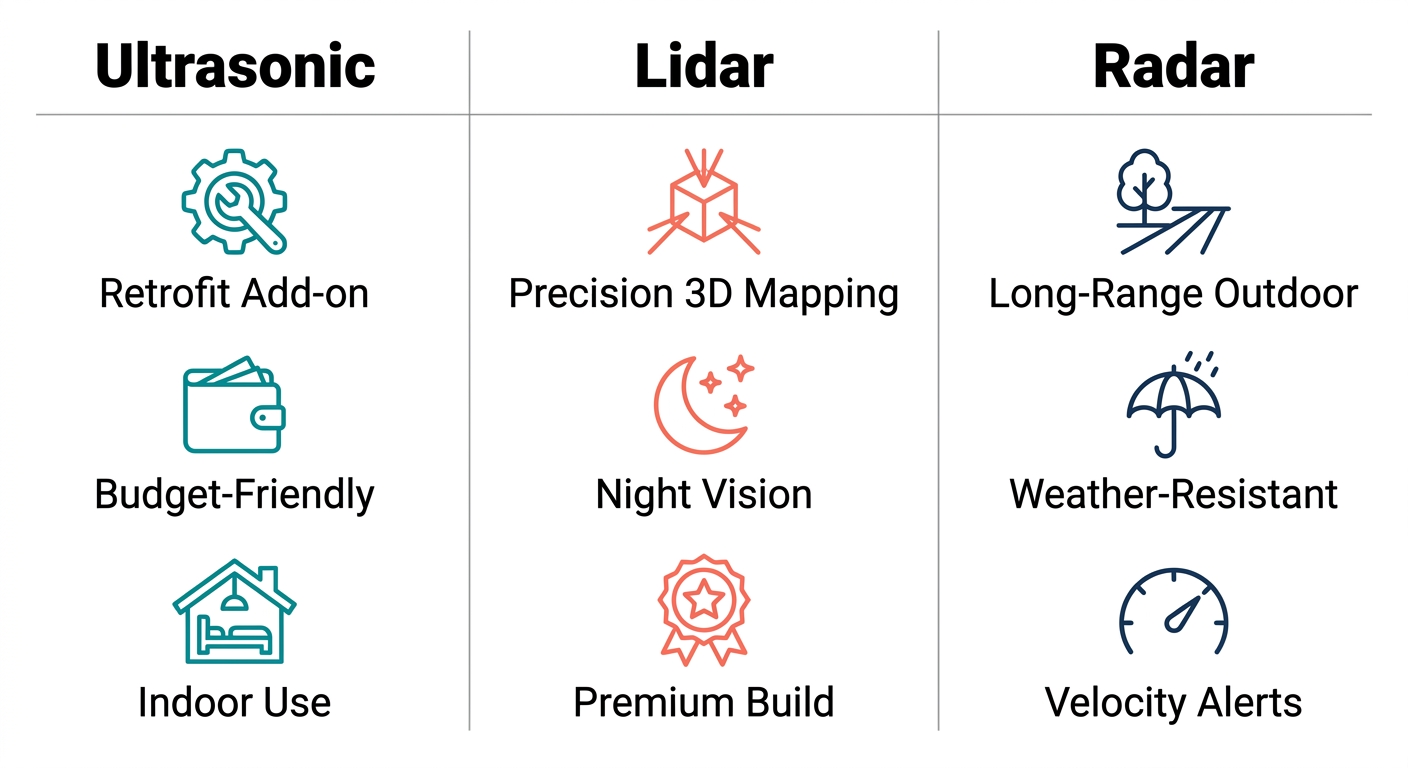
    Infographic comparing three collision avoidance technologies for wheelchairs: Ultrasonic, Lidar, and Radar, each with three key features.

    Infographic comparing Ultrasonic, Lidar, and Radar collision avoidance technologies for wheelchairs.

    Now that we understand obstacle detection, let’s compare collision avoidance systems for wheelchairs—smart wheelchair technology. Each balances cost against accuracy and environment suitability.

    Comparison of Collision Avoidance Technologies

    Product Sensor Type Price Range Best For
    Ultrasonic Collision Avoidance System Ultrasonic $200–$600 Affordable aftermarket add-on
    Lidar-Powered Smart Wheelchair Sensor Lidar $1,000–$3,000 High-end custom chairs, indoor/outdoor
    360-Degree Infrared Collision Shield Infrared $500–$1,200 Crowded indoor environments
    Radar-Based Proximity Warning System Radar $800–$2,000 Outdoor high-speed travel
    Camera Vision Obstacle Detection Module Depth-sensing camera $600–$1,500 Retrofit with caregiver monitoring
    Bumper-Activated Emergency Stop Sensor Mechanical contact $50–$200 Last-resort safety backup
    Acoustic Sonar Safety Package Sonar $300–$800 Wet or rainy environments
    Multi-Sensor Fusion Collision Protector Hybrid (ultrasonic, lidar, camera) $2,000–$5,000 Premium custom wheelchairs
    Bluetooth-Enabled Collision Alert System Bluetooth sensors + app $150–$400 Caregiver remote monitoring
    AI-Enhanced Predictive Avoidance Controller AI + multiple sensors $3,000–$6,000 Tech-savvy users, advanced mobility needs

    Once you’ve identified the right sensor type, our team integrates it into your custom motorized wheelchair, ensuring the system meets your needs. We verify Medicare coverage.

    Understanding Sensor Technology Differences

    Ultrasonic sensors ($200–$600) offer affordability but can struggle outdoors. Lidar ($1,000–$3,000) provides high-precision 3D mapping that significantly reduces collision risk indoors and out.

    How to Select the Right System for Your Needs

    MedEquipped evaluates your needs to recommend and integrate the best collision avoidance system. Alternative driving interfaces pair with it for greater independence. We verify insurance coverage and we’re here to help.

    Enhancing Wheelchair Safety with Collision Avoidance

    MedEquipped’s custom motorized wheelchairs integrate collision avoidance systems as a standard safety feature, as our front-wheel drive guide details. These sensors reduce accident risk for users with limited vision, slower reaction times, or cognitive impairments. Paired with alternative driving interfaces, the system enhances independence and safety.

    Key Benefits of Collision Avoidance Technology

    Smart wheelchair technology, including collision avoidance, delivers greater independence, enhanced safety, and caregiver confidence. It lowers the chance of collisions with walls and furniture, giving users and caregivers peace of mind.

    Next Steps – Contact MedEquipped for Personalized Advice

    Contact MedEquipped for guidance on collision-avoidance options and funding. We help you access aging and disability services and manage Medicare paperwork for a quick turnaround. Verify coverage; results may vary. Consult your healthcare professional.

  • Collision Avoidance Systems: Complete Guide to Smart Wheelchair Tech

    Collision Avoidance Systems: Complete Guide to Smart Wheelchair Tech

    Table of Contents

    Collision Avoidance Systems and Power Wheelchair Safety

    Building on the core safety features that protect power wheelchair users, collision avoidance systems represent a significant leap forward in smart mobility. These sensor-based technologies work continuously to detect obstacles in your path—whether a piece of furniture, a wall, or a person—and can alert you or even automatically apply the brakes to help prevent a collision. By reducing the risk of unexpected bumps and scrapes, collision avoidance technology allows you to move through tight indoor spaces and busy outdoor areas with greater confidence.

    At MedEquipped, we understand that navigating your environment shouldn’t be a source of stress. Integrating collision avoidance into your custom chair reduces the cognitive load required to monitor every angle simultaneously, freeing you to focus on going about your day. This same approach aligns with broader smart wheelchair technology, which aims to make power mobility safer, more intuitive, and better adapted to your life.

    We offer custom power wheelchairs that can be equipped with these advanced features, and because we handle the paperwork and insurance coordination, understanding your coverage options is straightforward. For example, our team can help you determine whether you qualify for a power wheelchair medicare funding pathway for a chair that includes collision avoidance. Our typical 30-60 day processing window means you spend less time waiting and more time enjoying the independence a thoughtfully configured chair provides. Results vary and this information is for educational purposes; please consult a healthcare professional before making clinical decisions about safety equipment.

    How Collision Avoidance Systems Work in Power Wheelchairs

    Building on the expanding world of smart wheelchairs, collision avoidance systems are a transformative addition that uses advanced sensor technology to help you navigate more safely and independently. These systems are designed to detect obstacles in your chair’s path and either warn you or take automatic action to prevent a collision, giving you greater confidence as you move through indoor and outdoor environments. This technology doesn’t replace your driving judgment but acts as an extra set of eyes, offering a helpful safety net for users with limited visibility or slower reaction times.

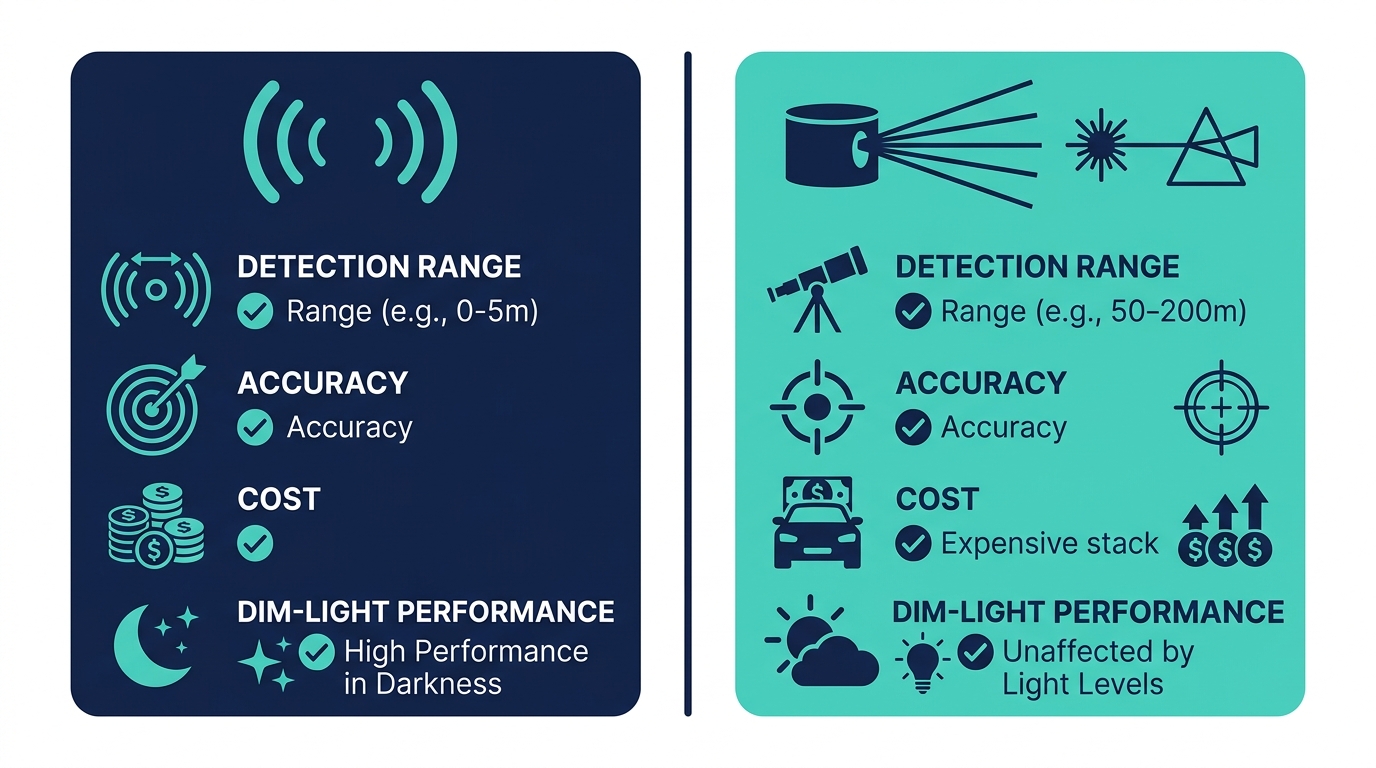
    At the core of these systems are two primary sensor technologies: ultrasonic and LiDAR. An ultrasonic sensor works much like a bat using echolocation. It emits high-frequency sound waves that bounce off nearby objects, and by measuring how long the echo takes to return, the system calculates the object’s distance. These sensors typically detect obstacles within a range of 0.2 to 4.5 meters with centimeter-level accuracy and function reliably regardless of lighting conditions. Ultrasonic sensors provide a cost-effective solution for basic detection needs, making them a common starting point for collision avoidance in power wheelchairs.

    A LiDAR sensor takes a different approach by using rapid pulses of laser light to create a detailed, millimeter-accurate map of the surroundings. With a detection range that can reach up to 30 meters, LiDAR excels at identifying objects at greater distances and in more complex layouts, giving the system a richer picture of the environment. Like ultrasonic technology, LiDAR remains completely unaffected by dim light or darkness, ensuring dependable performance no matter the time of day. This higher precision typically comes at a higher cost, reflecting the more sophisticated hardware involved.

    Sensor Technologies Comparison
    FeatureUltrasonicLiDAR
    Detection Range 0.2–4.5 meters up to 30 meters
    Accuracy centimeter-level millimeter-level
    Cost lower cost higher cost
    Performance in Dim Light unaffected unaffected

    For many users, the choice between sensor types comes down to balancing budget with the level of environmental detail needed. Ultrasonic sensors deliver reliable close-range protection and simplicity while LiDAR offers expansive, high-resolution awareness that can be especially useful in crowded or dynamic spaces. Regardless of the sensor type the system integrates directly with your wheelchair’s drive controller to interpret incoming data in real time and trigger responses that keep you safer.

    Side-by-side comparison infographic of ultrasonic and LiDAR sensor technologies used in power wheelchair collision avoidance systems

    Ultrasonic vs LiDAR sensor comparison for power wheelchair safety.

    When a potential collision is detected the system typically provides an auditory alert or haptic feedback such as a vibration in the joystick to get your attention. If you don’t react in time it can go a step further by automatically slowing the chair or applying the brakes to prevent contact. This seamless integration transforms your power chair into a true example of smart wheelchair technology that adapts to its environment. Obstacle detection technology like this makes daily mobility less stressful and more intuitive especially when navigating tight doorways, crowded rooms, or unfamiliar routes.

    According to MedEquipped’s internal product knowledge, collision avoidance systems are an important layer of protection but are not a substitute for safe driving practices. You remain in control of your chair at all times and anti-collision systems are meant to assist rather than replace your awareness. We help you navigate your options when selecting a power wheelchair equipped with these features ensuring the technology matches your daily needs and clinical requirements.

    For expert guidance on finding a reliable safety equipment supplier near me contact our team. We handle the paperwork, insurance navigation, and coordination so you can focus on what matters most: reclaiming your independence and exploring the world with a true partner in mobility freedom.

    Advanced Sensor Fusion and Smart Wheelchair Technology

    Building on the overview of core mobility features, the next frontier in power wheelchair design lies in intelligent environmental awareness. Modern collision avoidance systems transform how you interact with your surroundings, using advanced technology to create a safer, more intuitive driving experience. These systems do not replace attentive driving, but they provide a critical assistive layer, helping you navigate busy corridors, tight doorways, and crowded public spaces with greater confidence. At MedEquipped, we believe this smart wheelchair technology represents a true partnership between user and machine, enhancing independence without taking control away from you.

    How LiDAR and Ultrasonic Sensors Integrate in Multi-Sensor Systems

    The core of any advanced obstacle detection network is sensor fusion. This process combines data from multiple sensor types—primarily LiDAR and ultrasonic—to build a comprehensive, real-time picture of the environment. A single sensor type has inherent weaknesses; for example, ultrasonic sensors can struggle with very soft or angled surfaces, while LiDAR performance can degrade in heavy rain or fog. By fusing their data streams, the wheelchair’s processor compensates for these individual limitations, dramatically improving detection accuracy and reducing false positives.

    LiDAR, or Light Detection and Ranging, uses pulsed laser beams to measure distances with exceptional precision, creating a detailed 3D point cloud of the space ahead. According to MedEquipped’s technical resources, these lasers can map objects at significant ranges, providing crucial early warning for faster-moving chairs. Ultrasonic sensors, in contrast, emit high-frequency sound waves and measure their reflection, excelling at close-range detection of both soft and hard obstacles, like a person walking nearby or a piece of furniture. When these technologies work in tandem, the system cross-references LiDAR’s precise spatial map with the ultrasonic array’s reliable proximity data. This creates a redundant, robust safety net where one sensor type instantly verifies the other’s readings before triggering a response.

    The Role of AI in Obstacle Detection and Avoidance

    The raw data from a sensor array is just information; it takes artificial intelligence to turn that information into action. AI acts as the wheelchair’s brain, processing the fused sensor data in real-time to make split-second decisions. It is not simply reacting to a pre-set distance threshold. Instead, the AI classifies objects—distinguishing a static wall from a moving shopping cart—and predicts their future path, enabling adaptive navigation that feels smooth and natural rather than jarring.

    This intelligent system also learns and adapts to your personal driving style over time. If you prefer wider turns or a slower approach to doorways, the AI can adjust its intervention parameters accordingly. This personalization is a key step toward intuitive alternative driving interfaces, where the chair not only avoids obstacles on its own but also interprets subtle user commands more effectively. The following table highlights several premier models available through MedEquipped that showcase these cutting-edge capabilities, each offering a unique approach to sensor integration.

    Smart Wheelchair Models with Collision Avoidance Capabilities
    ModelSensor TypeDetection RangeAdditional Features
    QUICKIE Q700 M Ultrasonic + optional LiDAR 4.5m ultrasonic Adaptive cruise control
    ROVI X3 360° LiDAR up to 30m Autonomous navigation
    TDX SP2 HD Ultrasonic Proximity 2m range Adjustable sensitivity

    Source: Manufacturer specifications and MedEquipped product database.

    Understanding 360-Degree Collision Protection Systems

    A full-perimeter sensing system provides an invisible safety cocoon around your wheelchair. This is achieved by strategically placing multiple sensors around the base, creating a continuous detection zone that leaves no blind spots. The system constantly monitors this zone, ready to provide an alert, slow your speed, or execute a controlled stop if an obstacle is detected in your path. This is especially critical in dynamic, complex environments where hazards can appear from the side or rear.

    These collision avoidance systems rely on a concept called a ‘danger zone’, which is a digitally mapped area around the chair where objects trigger a response. When you drift too close to a wall or a person approaches from behind, the system can engage automatic braking or, in more advanced models, plot an alternative path around the hazard. For example, if a pedestrian suddenly steps in front of you, the system’s reaction time, measured in milliseconds, can augment your own reflexes, helping to mitigate an impact. Navigating the process of securing one of these advanced chairs can seem complex, but our team simplifies every step. These smart wheelchairs are often covered under wheelchair insurance — learn how we handle the process for you, managing paperwork and funding so you can focus on experiencing the freedom these technologies provide.

    Selecting and Configuring Collision Avoidance Systems for Your Power Wheelchair

    Choosing collision avoidance systems for your power wheelchair begins with a careful look at your daily life. We help you match the right obstacle detection technology to your home, your routines and your personal mobility goals. At MedEquipped, we view these safety sensors as a key part of smart wheelchair technology that gives you greater confidence behind the joystick.

    Evaluating Your Mobility Needs and Environment

    Start by thinking about where you drive most often. Indoor spaces like narrow hallways, tight doorways and crowded kitchens call for precise front and rear sensors. Outdoor environments add uneven terrain, curbs and moving obstacles such as pedestrians or shopping carts, so broader side detection becomes more valuable. We recommend listing your most common routes and noting every potential hazard you encounter.

    Collision avoidance systems come in several forms. Ultrasonic sensors use sound waves to detect objects within a set range and work well for general proximity warnings. Laser based systems offer finer distance measurement, which helps with precise positioning near furniture or doorways. Camera systems give you a visual feed of the surrounding area and can be paired with audible alerts. The right choice depends on whether you mostly navigate cluttered indoor rooms, open outdoor spaces or a mix of both.

    Funding can feel complicated, but we handle that part for you. Insurance coverage varies by payer, and you can check with Maryland state services for potential assistance through Medicaid or other programs.

    Working with a Certified ATP for System Selection

    A certified Assistive Technology Professional evaluates your clinical needs before any equipment decision is made. We coordinate with your ATP to review your posture, functional abilities, vision and reaction time. This step ensures the collision avoidance systems in your wheelchair complement your driving style rather than overwhelming you with unnecessary alerts. Smart wheelchair technology works best when it is tailored to you, not added as a one size fits all solution.

    We work with your ATP throughout the process, bringing our experience with custom motorized wheelchairs and insurance navigation to every case. Our team handles the paperwork, insurance navigation and coordination so you and your ATP can focus on clinical priorities. This partnership leads to a faster timeline from evaluation to delivery, typically within our 30 to 60 day processing window.

    Installation, Calibration, and Post-Delivery Support

    Once your ATP signs off on the recommendation, we move into the installation phase. We begin with a pre evaluation of your wheelchair to plan sensor placement. Our technicians mount the sensors securely and route wiring to avoid pinch points. Calibration follows immediately, adjusting sensitivity and range to match the obstacles identified during your ATP evaluation.

    Real world testing is our final quality check. We ask you to drive through doorways, navigate around furniture and back into your usual parking spot. This hands on validation confirms that the obstacle detection systems work reliably in the spaces you actually use. We fine tune settings on the spot so your chair feels responsive and predictable from day one.

    After delivery, we remain your partner in mobility freedom. Our team provides ongoing adjustments as your driving skills improve or your home environment changes. Proper configuration of your safety sensors keeps everyday driving smooth and sets the stage for the daily use and maintenance habits covered in the next section.

    AI Integration and Autonomous Navigation in Smart Wheelchairs

    Modern smart wheelchairs increasingly rely on artificial intelligence to transform how users navigate their environments, with collision avoidance systems playing a central role in this evolution. At MedEquipped, we see AI integration as the use of machine learning, computer vision, and sensor fusion to enable real-time decision-making and autonomous obstacle handling. Rather than simply reacting to nearby objects, these intelligent systems interpret surroundings, classify potential hazards, and plan the safest, most efficient path forward.

    Standard collision avoidance relies on basic proximity sensors that detect objects only when they are immediately near the chair. This reactive approach leaves the user responsible for manually steering around obstacles. In contrast, AI-enhanced systems use camera and LiDAR data together, allowing the chair to identify what an object is, predict where it might move, and generate an optimal route around it. This shift from reactive to predictive navigation represents a fundamental advance in smart wheelchair technology, offering smoother, safer movement through crowded or dynamic spaces.

    Over time, AI-powered navigation learns from user behavior, adapting to your preferred routes and improving efficiency with repeated use. This capability means the chair becomes more personalized, anticipating turns, doorways, and common stopping points in your home or workplace. For individuals with limited hand function or other physical constraints, alternative driving interfaces such as voice control, head arrays, and sip-and-puff systems can serve as input methods paired with AI navigation. According to MedEquipped, these interfaces integrate with advanced navigation systems to ensure that autonomous obstacle detection and intelligent path planning remain accessible regardless of a user’s physical capabilities.

    These AI capabilities set modern power wheelchairs apart by enhancing both safety and independence, letting you move through daily environments with greater confidence. We believe this technology is a natural extension of our commitment to being a partner in mobility freedom. Information is not medical advice and is for informational purposes only.

    Common Questions About Collision Avoidance for Power Wheelchairs

    You might be wondering how collision avoidance systems actually work in daily life. Here are clear answers to help.

    What is a collision avoidance system for power wheelchairs?
    It’s a smart wheelchair technology that uses sensors to detect nearby obstacles. Depending on the setup, the system can alert you or automatically slow and stop the chair.

    How does collision avoidance technology work?
    Sensors scan the area around your chair. When an object is too close, the system sends a signal to reduce speed or stop, helping prevent bumps and scrapes.

    What are the benefits of collision avoidance for wheelchair users?
    This safety system increases confidence, reduces caregiver stress, and makes navigating tight spaces easier. It’s a helpful aid, not a replacement for your attention.

    Can collision avoidance systems prevent all accidents?
    No. While the technology helps reduce the risk of collisions, user awareness is still essential. Please consult your healthcare professional for personalized advice.

    Does MedEquipped offer this on custom wheelchairs?
    Yes! We include collision avoidance options on our custom motorized wheelchairs. We’re here as your partner in mobility freedom, ready to tailor the right solution for you.

    Partner in Mobility Freedom: MedEquipped’s Commitment to Safety and Independence

    At MedEquipped, we serve as your partner in mobility freedom, delivering custom motorized wheelchairs built around your clinical needs and lifestyle. Our certified ATP evaluators perform thorough assessments so every chair integrates advanced features like collision avoidance systems and smart wheelchair technology to help you move with greater confidence. We handle the paperwork, insurance navigation, and coordination across New York, Georgia, and Michigan, typically completing orders in 30–60 days. If alternative driving interfaces fit your needs, we configure them and provide ongoing support long after delivery because your independence isn’t a one-time transaction, it’s an ongoing journey we walk together.

    Resources